Amazon FBA shipment creation is the process of registering, preparing, labeling, and physically sending your inventory to Amazon fulfillment centers through the Send to Amazon workflow in Seller Central. Getting this process right determines how fast your products go live, what fees you pay, and whether Amazon accepts your stock without delays. As of 2026, sellers carry full responsibility for prep and labeling, making accuracy more critical than ever. This guide walks you through every step of amazon fba shipment creation explained, from workflow setup to carrier selection and post-shipment tracking.
How to create an Amazon FBA shipment in Seller Central
Creating FBA shipments requires using the Send to Amazon workflow in Seller Central, where precise shipment details must be input to avoid processing delays. Incorrect entries feed directly into Amazon’s automated scheduling and compliance systems, causing downstream delays that can keep your inventory off the shelf for weeks.
Here is how to move through the workflow step by step:
- Log into Seller Central and go to Inventory > Shipments > Send to Amazon.
- Enter your ship-from address accurately. Amazon uses this to assign fulfillment center destinations and calculate carrier rates.
- Select your SKUs and enter quantities. Quantity mismatches between your shipment plan and the physical cartons you send are one of the most common causes of receiving delays.
- Choose a packing type. You can select individual units or case-packed units. If your products ship in identical case packs, use reusable case-pack templates to save time on future shipments.
- Select your shipping mode. Options include Small Parcel Delivery (SPD), Less-Than-Truckload (LTL), and Full Truckload (FTL). Your choice here affects both cost and lead time.
- Confirm and print labels. Once your shipment plan is confirmed, Amazon generates FBA Box ID labels that you apply to each carton before handing off to the carrier.
Pro Tip: Save your case-pack templates in Seller Central after your first shipment. Reusing them on repeat SKUs cuts setup time significantly and reduces the chance of entering wrong quantities.
The Send to Amazon workflow also surfaces Amazon’s Partnered Carrier program, where sellers can access discounted rates through UPS and other approved carriers. This is one of the most underused cost advantages available to small sellers.

What are Amazon FBA prep and labeling requirements for 2026?
Starting January 1, 2026, Amazon no longer performs internal prep and labeling, requiring sellers to manage all prep responsibilities before inventory leaves their facility. Labeling accuracy, especially FNSKU placement, is now the seller’s sole responsibility, and errors trigger costly inbound defect fees.
Here are the core prep and labeling rules you must follow:
- FNSKU labels must cover all manufacturer barcodes completely. If a scanner picks up the manufacturer barcode instead of the FNSKU, Amazon cannot match the unit to your account.
- Poly bags are required for soft goods, liquids, and fragile items. Any poly bag with an opening larger than 5 inches must display a suffocation warning printed directly on the bag or on a label attached to it.
- Carton weight is capped at 50 lbs, and standard carton dimensions cannot exceed 36x25x25 inches. Non-compliance results in inbound defect fees and potential shipment restrictions.
- Bundle packaging requires that all individual barcodes on component items be rendered unscannable, with a single FNSKU on the outer packaging marked “Sold as Set — Do Not Separate.” This prevents warehouse staff from breaking apart your bundle.
- Padding requirements mandate at least 2 inches of cushioning material on all sides of fragile items inside cartons.
| Requirement | Rule | Consequence of non-compliance |
|---|---|---|
| FNSKU labeling | Cover all manufacturer barcodes | Inbound defect fee, unit rejection |
| Poly bag suffocation warning | Required on bags over 5 inches | Shipment rejection |
| Carton weight limit | 50 lbs maximum | Non-compliance penalty |
| Carton dimensions | 36x25x25 inches standard | Dimensional surcharge |
| Bundle labeling | Single FNSKU, components unscannable | Bundle breakup at warehouse |
Common pitfalls triggering inbound defect penalties include uncovered manufacturer barcodes, missing suffocation warnings, and mislabeled bundles. Inconsistent labeling and prep quality are the top reasons for costly FBA fees and shipment delays. Sellers who adopt disciplined internal quality checks significantly reduce FBA fees and delays compared to those who treat prep as an afterthought.
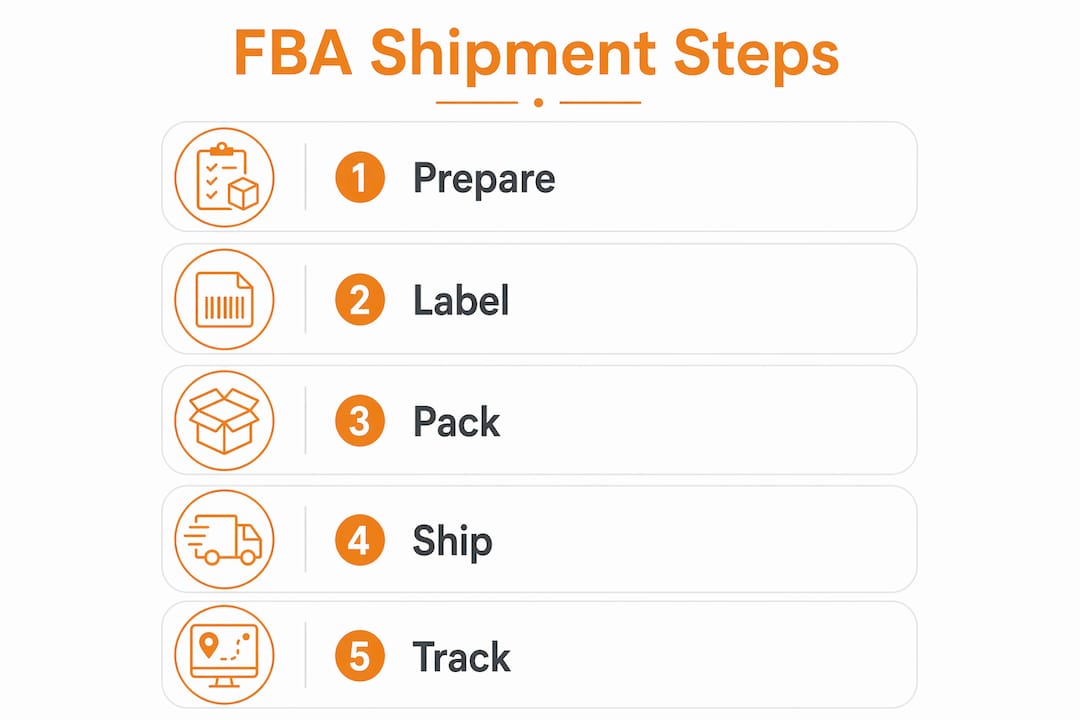
Pro Tip: Print a physical prep checklist and post it at your packing station. Running through it for every shipment takes two minutes and prevents the kind of errors that cost you days of stock availability.
For a deeper breakdown of every packaging rule, the FBA packaging requirements guide from ForwarderOne covers 2026 compliance in full detail.
How to pack your shipment and choose the right shipping method
Proper box packing and carrier selection are where many sellers lose money without realizing it. Overstuffed or improperly padded cartons not only risk product damage but can also trigger heavier dimensional shipping charges and non-compliance penalties. Pack each carton to the weight and dimension limits, use adequate padding, and never mix inventory from different shipment plans in the same box.
Applying FBA Box ID labels
Every carton must carry an FBA Box ID label, printed directly from Seller Central after you confirm your shipment plan. Place the label on a flat surface of the carton, away from seams and corners. A misplaced or obscured label means Amazon’s receiving team cannot scan the carton efficiently, which delays check-in.
Using 2D barcodes for carton contents significantly reduces Amazon receiving time by allowing a single scan to identify all units inside. This strategy can cut receiving check-in times from weeks to hours, which is a real competitive advantage during peak seasons like Q4.
Choosing between SPD, LTL, and FTL
| Shipping mode | Best for | Typical cost profile |
|---|---|---|
| Small Parcel Delivery (SPD) | Under 150 lbs total, fast turnaround | Higher per-unit cost, faster transit |
| Less-Than-Truckload (LTL) | 150 lbs to full pallet loads | Lower per-unit cost, longer lead time |
| Full Truckload (FTL) | Large volume, full truck capacity | Lowest per-unit cost, requires volume |
Sellers can save up to 50% on shipping costs using Amazon’s Partnered Carrier program for both SPD and LTL shipments. For most small to mid-sized sellers, SPD through the Partnered Carrier program is the right starting point. Once your shipment volume grows past a few pallets per month, LTL becomes the more cost-effective choice.
If you are shipping internationally, particularly from China, the DDP shipping checklist from ForwarderOne outlines exactly how to prepare overseas shipments for Amazon FBA receiving compliance in 2026.
How do you track your FBA shipment after it ships?
Amazon tracks shipment status through defined stages: Shipped, In Transit, Delivered, Checked In, and Receiving, with inventory becoming available after the Receiving stage completes. The typical timeline from shipping to inventory availability ranges between 3 and 14 business days, depending on fulfillment center volume and the time of year.
Here is how to stay on top of your shipment after it leaves your facility:
- Check the Shipping Queue in Seller Central regularly. This is your primary dashboard for monitoring status changes across all active shipments.
- Watch for inbound problem alerts. Amazon flags issues like label mismatches, prep non-compliance, and quantity discrepancies directly in the Shipping Queue. Address these immediately to avoid extended holds.
- Cross-reference your shipment plan against the receiving report. Accurate matching of shipment plan data to physical cartons is critical. Deviations cause receiving delays and reconciliation issues that can leave inventory in limbo for weeks.
- Contact Seller Support if inventory is not available after 14 business days. Open a case with your shipment ID and tracking number. Amazon’s receiving teams do lose cartons occasionally, and a support case creates a paper trail.
- Review your Inbound Performance dashboard monthly. This report shows your defect rate over time. A rising defect rate signals a systemic prep or labeling problem that needs fixing before Amazon imposes restrictions.
Pro Tip: Set a calendar reminder for day 10 after each shipment ships. If the status has not moved to Receiving by then, open a Seller Support case immediately rather than waiting until inventory is critically low.
Understanding the 2026 FBA fee structure helps you calculate exactly how inbound defects affect your margins, since each penalty has a specific dollar cost tied to it.
Key takeaways
Successful Amazon FBA shipment creation requires accurate data entry in the Send to Amazon workflow, strict compliance with 2026 prep and labeling rules, and proactive post-shipment monitoring to catch issues before they affect stock availability.
| Point | Details |
|---|---|
| Use Send to Amazon correctly | Enter accurate SKUs, quantities, and ship-from address to avoid receiving delays. |
| Own your prep and labeling | Since January 2026, sellers handle all FNSKU labeling, poly bagging, and bundle marking independently. |
| Match carton data to your plan | Deviations between physical cartons and shipment plan data cause reconciliation delays and inventory holds. |
| Choose the right shipping mode | SPD suits small shipments; LTL cuts costs at higher volumes; Partnered Carrier saves up to 50%. |
| Monitor the Shipping Queue actively | Track status stages and open Seller Support cases if inventory is not available within 14 business days. |
What most sellers get wrong about FBA shipment creation
I have seen sellers obsess over product sourcing and pricing while treating shipment creation as a box-checking exercise. That mindset is expensive. The Send to Amazon workflow is not a formality. It is the contract you make with Amazon’s inbound system, and every field you fill in becomes a data point their automation checks against your physical cartons.
The mistake I see most often is sellers entering estimated quantities rather than confirmed quantities. They plan to send 200 units, pack 195, and never update the shipment plan. Amazon’s system flags the discrepancy, holds the cartons for manual review, and the seller wonders why their inventory is not live three weeks later.
The second most common mistake is treating labeling as the last step rather than a quality gate. FNSKU labels applied over wrinkled poly bags, placed on carton seams, or printed at the wrong size are scanned incorrectly more often than sellers realize. One bad label in a case pack can hold up the entire carton.
What actually works is building a repeatable process. Use Seller Central’s case-pack templates. Print a prep checklist. Photograph your cartons before sealing them. These habits take minutes per shipment and save days of stock outages. Small sellers who treat their FBA prep operation like a professional warehouse, even if that warehouse is a spare bedroom, consistently outperform those who improvise.
— Keven
How ForwarderOne simplifies your FBA shipping from China
Managing FBA shipment creation is demanding enough without adding international freight, customs clearance, and import duties to the equation. ForwarderOne handles the full logistics chain for small to mid-sized Amazon sellers shipping from China to US fulfillment centers, including prep compliance, FNSKU labeling, and DDP delivery in a single workflow.
With over 99% on-time delivery and a dedicated account manager for every client, ForwarderOne removes the guesswork from FBA freight forwarding. Whether you are sending your first shipment or scaling to multiple containers per month, the team manages customs, duties, and Amazon-compliant delivery so you can focus on growing your catalog. Explore ForwarderOne’s FBA shipping services to see how DDP freight forwarding works for sellers at your stage.
FAQ
What is the Send to Amazon workflow?
The Send to Amazon workflow is the shipment creation tool inside Seller Central where sellers enter SKU details, quantities, and shipping preferences to register inventory before sending it to Amazon fulfillment centers. Accurate data entry in this workflow is required to avoid processing delays and inbound defect fees.
How long does it take for FBA inventory to become available after shipping?
Inventory typically becomes available between 3 and 14 business days after shipping, depending on fulfillment center volume and the time of year. Sellers can monitor progress through the Shipping Queue in Seller Central.
What are the FBA box weight and size limits for 2026?
Standard FBA cartons must not exceed 50 lbs in weight or 36x25x25 inches in dimensions. Cartons that exceed these limits trigger non-compliance penalties and may be refused at the fulfillment center.
Do I need to cover manufacturer barcodes on my products?
Yes. FNSKU labels must fully cover all manufacturer barcodes on each unit. If Amazon’s scanners read the manufacturer barcode instead of the FNSKU, the unit cannot be matched to your seller account, which causes receiving errors.
Can small sellers use Amazon’s Partnered Carrier program?
Yes. The Partnered Carrier program is available to all sellers through the Send to Amazon workflow and offers discounted rates through UPS and other approved carriers, with savings of up to 50% compared to standard shipping rates.
Need help preparing FBA inbound shipments?
Send your SKU count, carton plan, supplier city, Amazon destination, label requirements and restock date. ForwarderOne will coordinate prep, customs, DDP freight and final delivery to FBA.