Shipment tracking is defined as the process of monitoring a package or freight’s location, status, and condition from the moment it is picked up through final delivery. Carriers, shippers, and recipients all rely on this visibility to manage expectations and catch problems early. Tools like 17TRACK, ShipStation, and Owlery AI have made it possible to consolidate data from dozens of carriers into a single view. For Amazon sellers moving inventory from China to US fulfillment centers, understanding how package tracking works is not optional. It is the foundation of reliable logistics management.
What is shipment tracking and how does it work?
Shipment tracking is the systematic monitoring of a shipment’s journey through a supply chain, using unique identifiers and data collection points to report its status. Every tracked shipment begins with a tracking number, which acts as a unique identifier assigned by the carrier at pickup. That number ties every subsequent scan, status update, and location record to a single shipment record.
Tracking updates are generated primarily by barcode scans at logistics checkpoints, not by continuous GPS monitoring. This is one of the most misunderstood facts in shipping. A package does not broadcast its location in real time. It reports its location only when a warehouse worker, driver, or sorting machine physically scans it.

Tracking data flows from carriers to shippers through several channels: EDI status messages, API connections, GPS and ELD integrations, and carrier portal updates. Each update includes a location, a timestamp, and a status code such as “picked up,” “in transit,” or “delivered.” Multi-carrier platforms like 17TRACK and Owlery AI pull these feeds together so users see one unified timeline instead of logging into five different carrier portals.
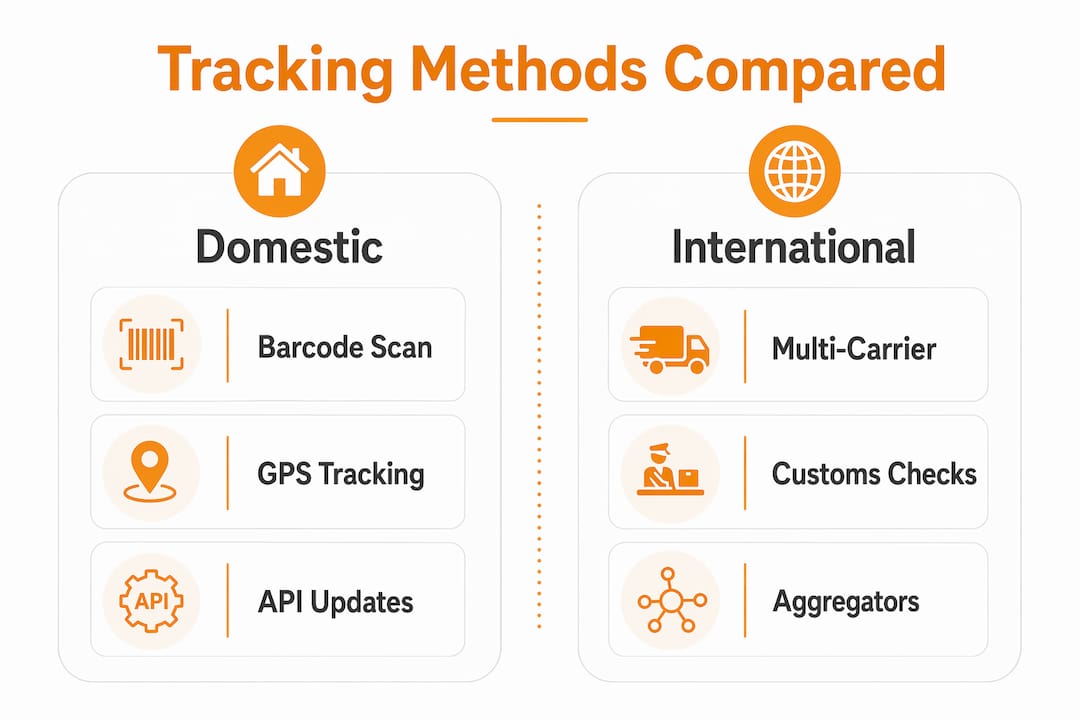
Tracking methods compared
| Method | How it works | Update frequency | Best for |
|---|---|---|---|
| Barcode scan | Package scanned at each checkpoint | Per handling event | Parcel and express freight |
| GPS / ELD | Device transmits live location | Continuous or near-continuous | Long-haul trucking |
| EDI messages | Carrier sends structured status files | Scheduled batches | Freight and LTL shipments |
| API integration | Real-time data pull from carrier systems | On-demand or near real-time | E-commerce platforms |
Pro Tip: If your tracking number shows no movement for 24 hours after pickup, do not assume the shipment is lost. The first scan often does not appear until the package reaches a primary sorting facility, which can take a full business day.
What shipment tracking tools do individuals and businesses use?
Primary tracking methods include entering a tracking number on a carrier’s website, using a mobile app with push notifications, or using a multi-carrier aggregator platform. Each approach serves a different level of need.
For individuals tracking a single package, carrier websites from USPS, FedEx, and UPS are the fastest option. Their mobile apps add push notifications, so you get an alert when status changes without checking manually. This works well for domestic shipments with a single carrier.
Businesses managing dozens or hundreds of shipments per week need more than a carrier portal. Multi-carrier aggregators solve this problem directly.
- 17TRACK: Supports over 2,400 carriers worldwide. Useful for businesses receiving shipments from international suppliers across multiple logistics providers.
- Owlery AI: Focuses on freight tracking with exception-based alerting. Flags delays and deviations automatically so teams act before problems escalate.
- ShipStation: Combines order management with branded tracking pages that keep customers on your site instead of redirecting them to a carrier portal.
- Carrier portals (USPS, FedEx, UPS): Best for single-carrier domestic shipments. Free, accurate, and updated directly from the source.
Branded tracking pages reduce customer support requests and build long-term brand trust more than redirecting users to third-party carrier sites. This matters for e-commerce sellers. Every time a customer lands on your branded tracking page instead of a generic carrier site, you control the experience and reduce the chance they contact support out of anxiety.
Pro Tip: Set up a multi-carrier aggregator like 17TRACK even if you primarily use one carrier. Supplier shipments, returns, and freight often involve carriers you did not choose, and a single dashboard prevents blind spots.
What makes international shipment tracking harder?
International shipments pass through multiple carriers, customs agencies, and sorting hubs before reaching the destination. Each handover is a potential gap in visibility. The most common problem is a tracking number change.
Tracking numbers often change when a shipment transfers between carriers during customs or transit phases. A package leaving China on a freight carrier may arrive in the US and transfer to USPS or FedEx for last-mile delivery under a completely different tracking number. If you are only watching the origin carrier’s number, the shipment appears to vanish.
Allow 48–72 hours after dispatch before expecting the first tracking update on an international shipment. Initial scans often do not populate until the package reaches a primary sorting facility. Sellers who panic and contact their freight forwarder within the first 24 hours are usually reacting to a normal delay, not a real problem.
Domestic vs. international tracking challenges
| Challenge | Domestic | International |
|---|---|---|
| Carrier handovers | Rare | Common, often with new tracking number |
| Customs clearance delays | Not applicable | Frequent, unpredictable |
| First scan delay | Hours | 48–72 hours typical |
| Tracking number changes | Uncommon | Expected at carrier transitions |
| Multi-carrier visibility | Easy with aggregators | Requires global platform like 17TRACK |
For Amazon sellers shipping from China, the freight tracking complexity of international routes makes a dedicated freight forwarder with integrated tracking visibility a practical necessity, not a luxury.
How to use shipment tracking to improve your logistics
Shipment tracking delivers the most value when it shifts from a passive lookup tool to an active management system. The difference is exception-based monitoring. Instead of checking every shipment manually, you configure alerts that fire only when something deviates from the expected path.
Proactive exception alerts configured in shipment tracking systems significantly improve operational efficiency by notifying teams only when deviations occur. This reduces manual status checks and speeds up problem resolution. A delayed shipment caught 48 hours before a promised delivery date is fixable. The same delay caught on the delivery date is a customer service crisis.
Branded tracking experiences add a second layer of value. When customers track their orders through your page instead of a carrier site, you reduce inbound support tickets and reinforce your brand at a moment when the customer is already engaged and paying attention.
Steps to build an effective shipment tracking workflow:
- Assign tracking numbers at pickup. Confirm your carrier or freight forwarder provides a tracking number the moment the shipment is collected.
- Load all shipments into a central platform. Use a multi-carrier aggregator or your order management system to consolidate visibility.
- Configure exception alerts. Set notifications for delays, failed delivery attempts, and customs holds. Do not track manually.
- Monitor destination carrier tracking for international shipments. When a tracking number changes at customs, update your records immediately.
- Use branded tracking pages for customer-facing communication. Send customers a link to your tracking page, not the carrier’s generic portal.
- Review exception data weekly. Patterns in delays or carrier failures reveal where your supply chain needs attention.
Shipment visibility also supports operational planning. Knowing a container will arrive three days late lets a warehouse team reschedule dock appointments. For Amazon FBA sellers, that same data prevents a stockout during a peak sales period. The Amazon FBA shipping methods you choose directly affect how much tracking visibility you get and how early you can act on delays.
Pro Tip: Do not wait for customers to ask “where is my order?” Set up automated shipping notifications at key status changes: shipped, out for delivery, and delivered. This single change cuts inbound support volume significantly for most e-commerce businesses.
Key Takeaways
Shipment tracking is most effective when it combines multi-carrier visibility, exception-based alerts, and branded customer communication into a single workflow.
| Point | Details |
|---|---|
| Tracking is event-based, not GPS | Updates appear only when a package is physically scanned at a checkpoint. |
| International numbers change | Monitor destination carrier tracking after customs handovers to avoid losing visibility. |
| Allow 48–72 hours for first scan | International shipments often show no update until reaching a primary sorting facility. |
| Exception alerts beat manual checks | Configure alerts for deviations so your team acts before customers notice problems. |
| Branded pages build trust | Keeping customers on your tracking page reduces support requests and strengthens your brand. |
Why most businesses are still doing tracking wrong
Most businesses treat shipment tracking as a lookup tool. A customer asks where their order is, someone logs into a carrier portal, reads the status, and replies. That workflow is reactive, slow, and completely avoidable.
The shift that actually changes logistics performance is moving to exception-based monitoring. You should never be the last person to know a shipment is delayed. A properly configured tracking system tells you before the customer notices, before the delivery window closes, and before the problem compounds.
The second mistake I see constantly is ignoring the tracking number handover problem in international shipping. Sellers watch their origin carrier’s tracking number go silent after customs and assume something went wrong. Nothing went wrong. The shipment transferred to a destination carrier under a new number. A global aggregator like 17TRACK solves this in minutes, but most sellers do not set it up until after they have already panicked through their first international shipment.
The third issue is treating tracking as purely operational. ShipStation’s branded tracking pages exist because tracking is also a customer experience moment. The customer is actively thinking about their purchase. That is not the time to send them to a generic carrier page. It is the time to reinforce your brand, offer related products, and reduce the anxiety that drives support tickets.
Shipment tracking done right is not just about knowing where a box is. It is about acting on that information faster than your competitors and using it to build customer confidence at every step.
— Keven
How ForwarderOne handles tracking for Amazon sellers
Amazon sellers shipping inventory from China to US fulfillment centers face every tracking challenge covered in this article at once: international carrier handovers, customs delays, tracking number changes, and tight FBA delivery windows.
ForwarderOne’s FBA and DDP freight forwarding service manages customs, duties, and delivery in a single workflow, with integrated shipment visibility so sellers always know where their inventory stands. With over 99% on-time delivery and a dedicated account manager for every client, ForwarderOne removes the guesswork from international logistics. Sellers who need reliable tracking from factory floor to Amazon fulfillment center without managing multiple carriers and portals can explore ForwarderOne’s China to USA DDP shipping options directly.
FAQ
What is shipment tracking in simple terms?
Shipment tracking is the process of monitoring a package’s location and status from pickup to delivery using a unique tracking number. Updates appear each time the package is scanned at a logistics checkpoint.
How do I track a shipment with multiple carriers?
Use a multi-carrier aggregator like 17TRACK, which pulls tracking data from over 2,400 carriers into one dashboard. For international shipments, also check the destination carrier’s tracking number after customs clearance.
Why is my tracking not updating?
Tracking updates require a physical scan at a checkpoint, so gaps are normal between handling events. International shipments typically take 48–72 hours before the first update appears.
What is the difference between real-time tracking and event-based tracking?
Real-time tracking uses GPS to broadcast a shipment’s location continuously, common in long-haul trucking. Event-based tracking, which covers most parcel and air freight, updates only at scan points like sorting facilities and delivery attempts.
What are the main benefits of shipment tracking for businesses?
Shipment tracking gives businesses early warning of delays, reduces customer support volume through proactive notifications, and supports warehouse planning by providing accurate arrival estimates. Exception-based alerts are the highest-impact feature for operational efficiency.
Need shipment visibility from factory to FBA?
Share your supplier, lane, cargo details and Amazon delivery target. ForwarderOne will coordinate tracking, customs status, delivery appointments and exception handling under one account manager.